
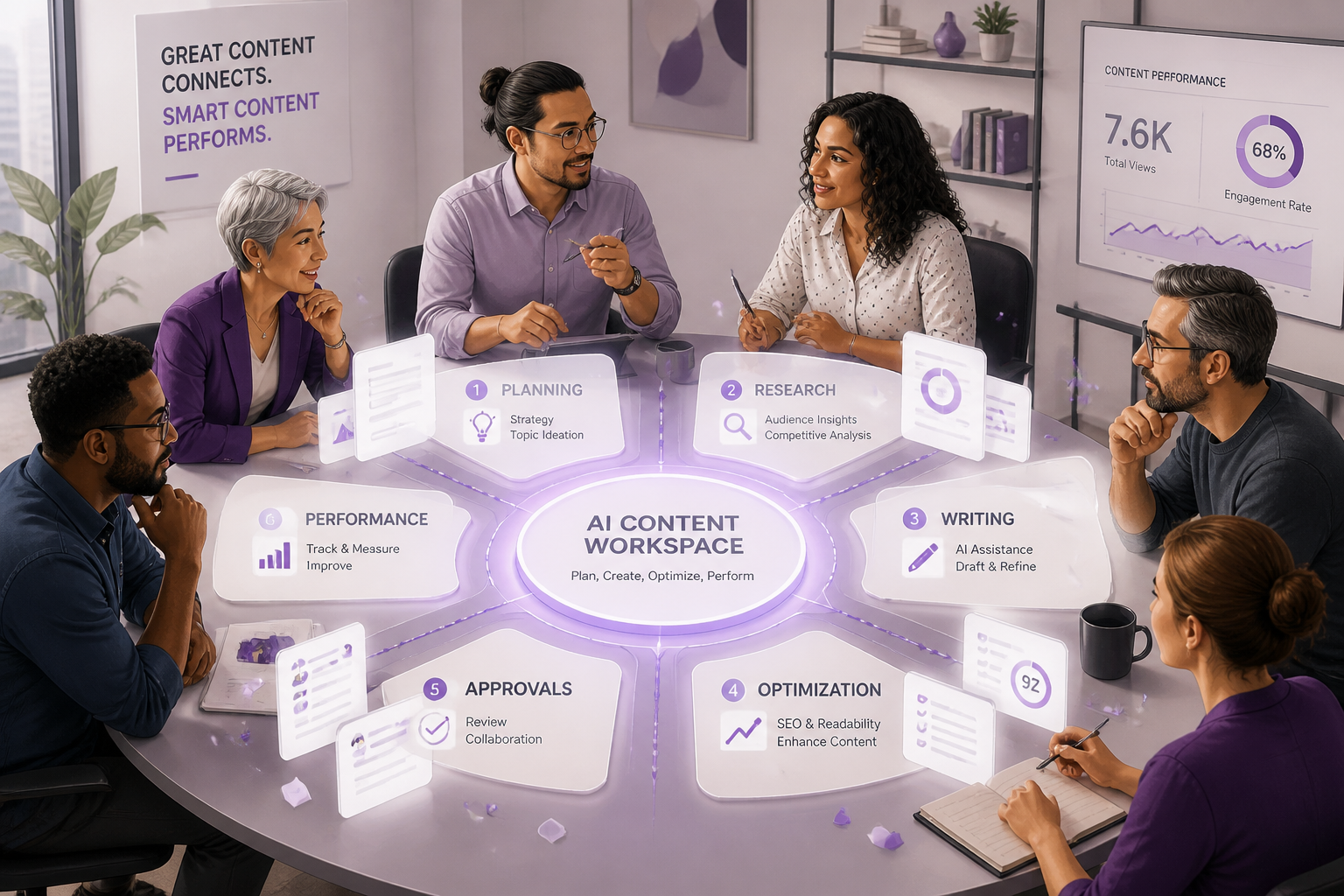
The AI Content Hub: Why Marketing Teams Are Replacing 10+ Tools with One AI Workspace
For many marketing teams, creating a single piece of content means moving among an LLM for a first draft, research tabs for sources, an image tool for visuals, an SEO platform for optimization, a document for edits, a CMS for publishing, analytics for results, and collaboration apps for approvals. Agencies, SaaS teams, startups, and solo creators may have access to more AI than ever, yet the work itself can still feel scattered. The challenge is not a lack of AI tools but disconnected content operations: lost context between platforms, inconsistent inputs and brand voice, duplicated work, and slower decisions at every handoff. An AI Content Hub offers a more connected approach by bringing planning, creation, optimization, collaboration, and publishing into one coherent workflow. Inkpilots helps address these gaps through AI-assisted content generation, an intuitive editor, API access, collaboration-ready workflows, and publishing capabilities for websites and content workflows. This model gives modern content teams a more practical way to keep work connected from idea to publication.
What Is an AI Content Hub?
An AI Content Hub is a unified workspace that connects research, planning, multiple AI models, drafting, editing, brand context, media creation, optimization, review, and publishing in one content workflow. Unlike a single AI writing assistant or a loose bundle of integrations, it gives every stage access to the same briefs, audience insights, brand guidelines, source material, and prior decisions. This shared context is the defining capability: it stays with the content as it moves from idea to publication, reducing handoffs, repeated prompting, and inconsistencies across content operations.
- Research and source context — gather briefs, references, audience insights, and approved source material in one working environment.
- Multi-model generation — use appropriate AI models for ideation, outlining, drafting, analysis, and specialized content tasks.
- Structured drafting and editing — move from outline to draft to revision with clear sections, version control, and editorial guidance.
- Reusable knowledge and brand guidance — apply messaging frameworks, voice rules, product information, and approved terminology consistently.
- Image and media generation — create or coordinate visual assets that support written content and campaign requirements.
- SEO and GEO checks — review content for search intent, on-page SEO fundamentals, and visibility in generative search experiences.
- Collaboration and approvals — enable writers, editors, subject-matter experts, and stakeholders to review, comment, and approve work efficiently.
- Agent workflows — assign repeatable AI-assisted tasks such as research, optimization, repurposing, and quality checks to defined workflows.
- Publishing and distribution — prepare approved content for CMS, social, email, and other channels while keeping formats and metadata organized.
Why the AI Content Hub Category Is Emerging ?
Point solutions made sense when teams were testing AI on isolated tasks: drafting a blog post, generating social captions, creating an image, or checking SEO basics. That approach becomes harder to manage as content volume grows and teams adopt multiple models and specialized tools for research, writing, design, optimization, localization, and distribution. Each handoff can create duplicated context, inconsistent outputs, and unclear ownership—especially when one campaign must be adapted across web pages, articles, email, social, sales enablement, and other formats. Faster iteration raises the stakes: teams need brand rules, source materials, approvals, and performance learnings to travel with the work rather than live in separate prompts and platforms. The emerging AI Content Hub category addresses this operational gap by treating AI not as a collection of experiments, but as a repeatable content operating system that connects workflows, governance, and specialized AI agents for marketing.
The Problems With a Fragmented AI Content Workflow
- Context loss: Teams must re-explain audience, product details, campaign goals, and prior decisions whenever work moves between AI tools or people, increasing the chance of off-target output.
- Repeated prompting: Marketers recreate prompts, instructions, and background information for each tool instead of building on a shared content brief or reusable workflow.
- Inconsistent brand voice: Separate tools and contributors apply different tones, terminology, and messaging rules, so published assets need more editorial correction to sound cohesive.
- Version confusion: Drafts, revisions, source files, and AI-generated variations live across disconnected locations, making it unclear which asset is approved and current.
- Duplicate subscriptions: Teams pay for overlapping AI capabilities because no one can easily see which tools are already available, adopted, or delivering value.
- Disconnected feedback: Comments from editors, subject-matter experts, sales teams, and customers remain in separate channels, leaving AI outputs and future briefs disconnected from what was learned.
- Manual asset handoffs: Copy, briefs, images, prompts, and approvals are copied between tools by hand, adding administrative work and opportunities for missing or outdated information.
- Weak quality control: Without shared checkpoints for factual accuracy, SEO and GEO optimization, brand compliance, and approvals, issues are caught inconsistently or after publication.
- Delayed publishing: Time spent locating files, reconciling feedback, rerunning prompts, and waiting for handoffs extends the path from idea to published content.
- Limited visibility into what works: Performance data is not connected to the briefs, prompts, and production choices behind each asset, making it difficult to improve the AI content stack systematically.
The Hidden Cost of Context Switching
Each switch between tools forces someone to rebuild the working context: the brief, intended audience, source material, style rules, approval history, and decisions already made. That reconstruction takes time, but the larger cost is cognitive. When context is partial or scattered, teams make weaker judgment calls, repeat resolved questions, and produce work that varies in tone, accuracy, and strategic focus. The attention spent reassembling the workflow is attention unavailable for higher-value work, such as improving the message, testing an angle, or planning the next content opportunity.
What Marketing Teams Gain by Consolidating Content Operations
A unified AI content workspace gives teams shared context across briefs, research, brand guidance, drafts, approvals, and performance learnings. This strengthens content operations by making ownership visible, reducing unnecessary handoffs, and helping every contributor and AI agent work from the same current information. The result is more consistent brand execution, faster draft-to-publish cycles, easier reuse of proven knowledge, lower operational overhead, and more reliable quality checks. Consolidation should not remove human judgment: people still set priorities, validate claims, approve final work, and make the decisions that require brand, customer, and business context.
From Brief to Published Asset in One Connected Workflow
- Start with a campaign brief that defines the audience, business goal, key message, channel, format, deadline, and approval owners. Store the brief with the project so every contributor and AI assistant works from the same source of truth.
- Run research in the same workspace: collect customer questions, search intent, product details, subject-matter input, competitor context, and credible sources. Turn the findings into a reusable research pack rather than copying notes across separate tools.
- Build an outline from the brief and research pack. Confirm the angle, heading structure, claims that need evidence, internal links, calls to action, and the assets required before drafting begins.
- Use the appropriate AI model to create a first draft from the approved outline, brand guidance, and research context. Keep the draft in the project so prompts, source material, and revisions remain connected.
- Have an editor refine the draft for accuracy, voice, clarity, structure, and audience fit. Comments and block-level revisions can stay beside the content instead of moving through exported documents and email attachments.
- Create supporting images, illustrations, or social assets from the approved creative direction, then place them directly in the relevant content blocks with captions, alt text, and usage notes.
- Complete an SEO and GEO review: check search intent, headings, topical coverage, internal links, metadata, schema requirements, factual support, and whether the page gives clear, citable answers for AI-driven search experiences.
- Route the near-final asset to stakeholders for approval, with the brief, draft, media, and change history available in one place. Resolve feedback in the document so approved decisions are not lost between versions.
- Publish the approved content to the destination channel from the connected workspace, then retain the source, assets, and performance notes for future updates. Platforms such as Inkpilots illustrate this hub approach by bringing multiple AI models, a block-based editor, media generation, and publishing into a connected workspace.
How AI Agents Change Content Production Without Replacing Marketers
AI agents can take on defined, repeatable jobs within a content process rather than attempting to run the entire workflow alone. For example, an agent can turn an approved brief into a structured outline, check draft claims against a knowledge library, suggest repurposing angles for social posts or email, identify missing SEO and GEO elements, or prepare a draft and its supporting notes for an editor’s review. These workflows work best when the agent has clear inputs, limited permissions, documented guardrails, and an explicit approval gate. Teams should decide which sources an agent may use, what it can change, where it must flag uncertainty, and who signs off before content moves forward. Autonomous publishing is not appropriate for every channel or content type; human review remains essential for accuracy, brand judgment, compliance, and sensitive topics. Within an AI Content Hub, agent workflows connect these tasks to the same briefs, source materials, standards, and review stages. That shared context helps agents support content operations consistently while keeping people accountable for final decisions.
SEO and GEO Advantages of a Centralized Content Workflow
A centralized AI Content Hub can strengthen traditional SEO by keeping search intent, headings, internal terminology, topical coverage, updates, and on-page review in one workflow. Teams can check that each page answers the intended query, uses a clear heading structure, connects consistently to related content, fills meaningful topic gaps, and is refreshed when information changes. GEO, or generative engine optimization, means making content easier for AI-powered search and answer systems to interpret, summarize, and potentially cite. Write direct definitions and well-structured answers; establish clear context for the people, products, places, and concepts discussed; support claims with appropriate evidence; and add original, useful guidance rather than generic filler. A disciplined workflow improves the consistency of these practices, but it cannot guarantee search rankings, traffic, or inclusion in AI-generated answers.
Why Shared Knowledge Libraries Matter
A maintained knowledge library gives both people and AI systems a stronger basis for creating useful, on-brand work. It can bring together brand positioning, current product facts, approved terminology, customer insights, subject-matter expertise, and examples of past high-performing content. Instead of asking every writer or AI assistant to reconstruct that context from scattered folders and chat threads, teams can use it to guide briefs, drafts, edits, and reviews. This improves consistency, helps content reflect real customer and product knowledge, and makes differentiated messaging easier to sustain—while still requiring human validation for claims and updates. An AI Content Hub such as Inkpilots can make this shared context available where drafting and editing happen, rather than leaving it fragmented across the wider AI content stack.
How to Evaluate an AI Content Hub
- Confirm model flexibility: Can the platform support the language models your team prefers, allow model switching by task, and make model usage transparent?
- Test source and brand-context preservation: Verify that approved messaging, audience definitions, product facts, style guidance, and source materials remain available and are applied consistently across work.
- Assess editor quality: Review drafting, rewriting, commenting, version history, structured content support, and the ease of moving from an AI draft to publication-ready copy.
- Check collaboration controls: Look for clear roles, approvals, shared workspaces, assignments, change tracking, and safeguards against conflicting edits.
- Evaluate knowledge-library support: Determine whether the team can organize, update, search, cite, and govern reusable documents, briefs, brand assets, and subject-matter expertise.
- Validate SEO and GEO workflow support: Check whether the workspace supports keyword research, search intent, on-page optimization, source-grounded answers, structured content, and review processes for AI-search visibility.
- Review media capabilities: Confirm how images, video, audio, creative briefs, asset libraries, alt text, and usage rights fit into the content workflow.
- Map integrations and the publishing path: Identify connections to your CMS, analytics, design tools, project management systems, and distribution channels, or confirm that exports work cleanly when integrations are unavailable.
- Inspect security and permissions: Verify access controls, workspace separation, authentication options, audit logs, data retention practices, and controls for sensitive or client content.
- Check export portability: Ensure content, metadata, source links, assets, and performance records can be exported in usable formats without locking the team into a proprietary workflow.
- Define workflow outcome measures: Track practical indicators such as time from brief to approval, revision cycles, content throughput, source-use compliance, publishing errors, and performance against stated content goals.
- Before deciding, run a real end-to-end workflow—from brief and research through drafting, review, approval, publishing, and measurement—rather than judging the platform on isolated demos.
The Future of AI-Powered Content Teams
The next advantage in content will not come simply from access to a capable model. As model capabilities become more widely available, the differentiator will be an organization’s ability to orchestrate trusted context, repeatable processes, specialist AI agents, and human editorial judgment in one connected system. The strongest teams will design content operations that make quality, differentiation, and governance easier to maintain as output grows. They will give agents clear roles, ground work in approved sources and brand knowledge, build review points into production, and use feedback to improve the workflow over time. This approach reduces the fragmentation of an AI content stack while keeping people accountable for accuracy, voice, and strategic decisions. Viewed this way, an AI Content Hub is not a passing software label. It is a practical operating model for coordinating people, context, tools, and AI-assisted work so content can scale without losing trust or distinctiveness.
Conclusion: Build a Connected Content System, Not a Bigger Tool Stack
Fragmented AI content workflows do more than add subscriptions: they scatter context, weaken brand consistency, create handoff friction, and make it harder to maintain editorial oversight from brief to publication. A connected AI Content Hub brings creation, optimization, collaboration, and publishing into one operating environment so teams can spend less time moving work between tools and more time improving the work itself. Platforms such as Inkpilots illustrate this emerging model, but the operational principle matters more than any single platform. Choose a workflow that keeps brand knowledge accessible, gives editors clear control, and makes SEO and GEO optimization part of the production process rather than a final-stage fix. The strongest AI content stack is the one that helps your team move faster without compromising the standards that make its content trustworthy.
Frequently Asked Questions About AI Content Hubs
- What is an AI Content Hub? An AI Content Hub is a shared workspace that brings together content planning, research, creation, optimization, approvals, and performance feedback. It helps teams manage an otherwise fragmented AI workflow by connecting the people, prompts, assets, and processes behind content operations.
- Does an AI Content Hub replace every marketing tool? No. It can reduce tool switching and centralize parts of the AI content stack, but specialized tools may still be needed for analytics, CRM, design, publishing, or paid media. The goal is better coordination between systems, not automatically replacing every system.
- How is an AI Content Hub different from an AI writer? An AI writer primarily generates or rewrites text from a prompt. An AI Content Hub supports the broader workflow around that text, including briefs, source context, brand guidance, collaboration, review steps, optimization, and content reuse.
- Who benefits most from an AI Content Hub? Marketing agencies, content teams, SaaS companies, startups, solo marketers, and creators benefit when they produce content repeatedly across channels. It is especially useful for teams managing multiple clients, contributors, approval stages, or AI agents for marketing.
- How does an AI Content Hub support SEO and GEO optimization? It can make SEO work more consistent by organizing keyword research, search intent, internal linking, on-page requirements, and content updates in one workflow. For GEO optimization, it can help teams structure accurate, source-aware answers that are easier for generative search systems to interpret and cite.
- Do teams still need human editors when using an AI Content Hub? Yes. Human editors remain responsible for accuracy, originality, brand voice, legal or compliance review, and judgment about what deserves publication. AI can accelerate drafts and routine checks, while editors provide the quality control and strategic perspective automated output cannot reliably supply.
- What should teams prioritize when adopting an AI Content Hub? Start with the workflow problems that create the most delay or inconsistency, such as unclear briefs, scattered source material, weak review processes, or duplicate content effort. Define ownership, editorial standards, approved data sources, and success measures before expanding automation. A practical example is using Inkpilots to coordinate research, drafting, and review in a single content workflow.